Programmable Search Engine Blog
The latest news, updates and tips from the Programmable Search Engine team
JibJab + Google Site Search = more laughs
Thursday, August 26, 2010
Today’s guest post comes from Chris Poe, Engineering Director at JibJab Media
The folks at
JibJab
are good at doing two things: Making people laugh and... Okay, so maybe weʼre REALLY good at one thing: Making people laugh. Finding the perfect birthday eCard for your friends and family has always been a priority for us here at JibJab. We all felt that search would be the perfect compliment to our existing browsing experience and then we discovered
Google Site Search
... our wildest dreams were about to become reality.
Seriously. We get search functionality without having to build search functionality.
The beauty of Google Site Search is that it can all be done with a small addition to your web page markup and no change to the back end of your web application.
Using the
PageMaps
functionality Site Search provides, we are able to embed metadata in our web pages that will be returned in our Site Search query results. This lets us format the data you are looking for in a very JibJabby way.
With features like
Autocompletions
and
Refinements
, we will be able to evolve the Site Search functionality on our site and help our users make people laugh for a long time to come.
Posted by:
Chris Poe, Engineering Director at JibJab Media
Autocompletion of queries in Custom Search
Tuesday, May 18, 2010
One of the most requested features for Custom Search is autocompletion of queries. Today,
we announced at Google I/O
that you can now enable query autocompletions for your search engine.
The screenshot below shows an example of query autocompletion at
Travelocity
.
Custom Search autocompletion is similar to what you see on Google.com—optional queries appear as you type your query in the search box. However, behind the scenes, we do a lot of things differently. We created a different algorithm that uses data from multiple sources, including queries to your search engine, as well as keywords and phrases extracted automatically from the content of websites that your search engine covers.
Because the autocompleted queries are based, in part, on the specific content of the webpages covered by your search engine, we will
not
generate autocompletions for custom search engines that search the entire web, i.e., autocompletions will only work if you set your preferences to
Search only included sites
in the control panel.
To enable autocompletions, select
Enable autocompletions
in the Basics tab of the control panel.
After you’ve saved your settings, replace the code for the search box in your website with the search box code from the
Get code
tab and you're done. Please note that it can take a few hours for us to start generating autocompletion queries for your search engine.
If you are using the Custom Search Element with a
theme
, the autocompletions are styled to match the look and feel of your theme. Autocompletions will also work on high-end
mobile devices
.
We hope that you find the feature useful. As always, give us
feedback
so we can improve the feature.
Posted by: Bartlomiej Niechwiej and Jeffrey Scudder,
Software Engineers
New Site Search features, upgrades for Adobe Creative Suite 5
Friday, April 30, 2010
The just-released
Adobe® Creative Suite 5
(CS5) now includes a
new Community Help
application, powered by Google Site Search. It’s an Adobe AIR®-based companion that’s automatically installed as part of any new Adobe CS5 product.
Launched directly from the Help menu of any CS5 product, the Community Help application provides a customized search experience across about 3000 sites. Customers can find fast answers with powerful new options to focus results just on Adobe content, community content, developer resources, and even code samples.
The Adobe development team used the XML API to integrate search results and also create unique innovations such as Code Search. Formerly known as
Blueprint
(
demonstrated
at Google I/O last year) this new search option allows Adobe Flash® and Flex developers to search for relevant code samples so that they can write better code, faster.
Community Help can also be used as a standalone application. To give Community Help a try, you can
download
it from adobe.com.
To learn more about how Adobe Community Help uses Site Search, see our blog post on the
Google Enterprise Blog
.
Posted by: Rajat Mukherjee, Group Product Manager, Search
Custom Search now available in Parallels Plesk Panel
Wednesday, April 14, 2010
Website owners who use Parallels Plesk Panel to manage their hosting and website services can now configure Custom Search and Site Search in a couple of clicks! As
announced
on the Google Blog,
Plesk
now offers out-of-box integration with
Google Services for Websites
.
If you’re one of the millions of webmasters already using Plesk Panel, you can now easily add high-quality search to your websites via the Custom Search page shown above. Since Plesk Panel knows what domains you own, a drop-down list of your domains is conveniently offered for automatic configuration of the search engine, as shown below.
Once you’re done configuring your search engine, you can customize the search experience to match the look and feel of your website. As shown in the screenshot below, Plesk provides links that you can click to directly manage and customize your search engine with the Custom Search control panel -- you will be automatically logged in.
After you decide on the
theme and layout
for your search, you can get the search code to insert into your website so your users can easily find what they are looking for. Finally, you can also click through from Plesk to access your search statistics. If you want support and more control over advertising, branding, and indexing, you can initiate an upgrade to
Site Search
right from within Plesk.
We hope this will make it easier for you to manage your site search experience. As always, let us know if you have
feedback
.
Posted by: Radu Cornea, Software Engineer and Jae Jung, Business Development Manager
Custom data rendering in results
Wednesday, April 14, 2010
Since the launch of Custom Search, we've been constantly pushing the customization envelope -- allowing users to tweak ranking, provide refinements, add promotions above results, change the look and feel, select from
themes
and modify layouts.
We did not stop there. We added support for custom
synonyms
, and the ability for website owners to mark up their content with structured metadata. With
structured Custom Search
, you can create results with rich snippets, e.g., thumbnails and actions.
Now, through
Custom Search data rendering
in the element, we’re providing you the ability to completely customize the layout of each result. With simple inline markup on the search page, you can override result attributes, decide how each result is formatted, control the size and location of thumbnails and highlight result metadata.
The screenshot below shows an example of formatted result blocks for a sample search based on data from
Scribd
-- thumbnails have been reduced in size, and a new line containing metadata, including an icon for document type, has been inserted into the result.
We hope you’ll use the power of data rendering in your own search. For a step by step guide on how you can control the data rendering in results with the Custom Search Element, please read our post on the
Search API blog
.
Posted by: David Gibson and Nicholas Weininger, Software Engineers
Synonyms made easy
Wednesday, March 17, 2010
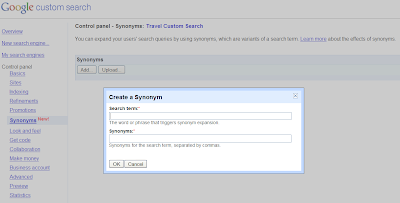
The Custom Search team is always working to provide more relevant results, and improving user queries is a big part of that goal. We've shown you how to create
refinement labels
for queries and create
custom synonyms
for your search engine. We have been working to improve the ease of management of these features.
Today, we're excited to announce that we've made it easier than ever for Custom Search and
Site Search
administrators to enable advanced synonym options. Now, you can add sets of synonyms specific to your website content and can also trigger search expansion, so that a query automatically triggers results for synonymous terms.
Google already has a large body of synonym data for general search terms, and since Custom Search lets you harness many of the search features of Google.com, you shouldn't bother replicating this functionality. Instead, focus on adding synonyms for queries specific to your website.
It's easy for you to add synonyms to your accounts; simply log into the control panel and add or delete search terms you want to trigger the synonym expansion. Or, if you have a large number of terms to add, you can create an XML file and quickly upload that to your account.
You can add up to 500 variants for each search engine. For more information you can check out the Custom Search API
documentation
.
As shown above, there's a new Synonyms link on the control panel.
Try it out
on your search engine.
Posted by: Tianyu Wen, Software Engineer
Creating standalone search results pages with the element
Tuesday, March 16, 2010
With the launch of Custom Search
themes
, you have the ability to select from among a set of result styles, as well as decide on the layout for the search box and search results. Specifically, we offer commonly-used layouts:
full-width
(search box and search results together),
2-column
(search box and search results in separate areas of the webpage), and
compact
(perfect for search widgets on a page, as well as for
mobile search results
). These layouts all provide an in-line search experience so that users don’t need to leave the page they are currently on.
Some webmasters, however, prefer to have the search results show up on a
different
page from the search box, so we wanted to let you know how to do this. We have a
detailed post
on the AJAX API blog with specific instructions.
As always,
let us know
if you have other questions we can answer.
Posted by: Jeff Scudder, Developer Programs Engineer
Archive
2026
Feb
Jan
2024
Apr
2023
Dec
Oct
Jun
2022
Aug
Jul
Jun
Feb
2021
Apr
Jan
2020
Nov
Oct
Sep
Aug
Jun
Apr
2019
Jul
Jun
Apr
2018
Jul
2017
Jul
Feb
2014
Mar
2013
Dec
Oct
Sep
Mar
Jan
2012
Aug
Jun
May
Mar
Feb
Jan
2011
Dec
Nov
Oct
Sep
Aug
Jul
Jun
Apr
Mar
Feb
Jan
2010
Dec
Nov
Oct
Sep
Aug
May
Apr
Mar
Feb
Jan
2009
Dec
Nov
Oct
Sep
Aug
Jul
Jun
May
Apr
Mar
Feb
Jan
2008
Dec
Nov
Oct
Sep
Aug
Jun
May
Apr
Mar
Feb
Jan
2007
Dec
Nov
Oct
Sep
Aug
Jul
Jun
May
Apr
Mar
Feb
Jan
2006
Dec
Nov
Useful links
Programmable Search Engine
Help Center
Support Forum
Developer Documentation
Google AdSense Blog